

ten safeguards every restaurant and retailer needs
Every restaurant and retailer needs, at a minimum, ten basic safeguards: multi-factor authentication, one login per person, automatic updates, security software on every computer, a business-grade firewall with guest Wi-Fi kept separate, tested backups, a locked-down payment setup, staff phishing training, secured device settings and a written incident plan. None of them needs an IT department. All of them need an owner.
Turn on multi-factor authentication (MFA) for email, your POS back office, banking and every administrator account.
Give every person their own login, and remove it the day they leave.
Install updates automatically, and replace software that no longer gets them.
Run security software on every computer and server, not just the office PC.
Put a business-grade firewall in front of the network, and keep guest Wi-Fi away from payments.
Back up what you cannot afford to lose, keep a copy somewhere separate, and test that it restores.
Protect card payments: use approved terminals, do not store card data and control vendor remote access.
Train your team to spot phishing, and repeat it.
Change default passwords and secure every device, from routers to printers to tablets.
Write a one-page incident plan with phone numbers, before you need it.
This list is our reading of two public sources: the Canadian Centre for Cyber Security's baseline controls for small and medium organizations, which has 13 areas, and the PCI Security Standards Council's guide for small merchants. We narrowed them to what a restaurant or store can realistically do, and where we have made a judgment call we say so. "Minimum" is a floor. It makes you a harder target. It does not make you safe.
Why restaurants and retailers need a cybersecurity minimum
Restaurants and stores are exposed because attackers do not pick targets by industry. The Canadian Centre for Cyber Security says ransomware actors "are almost certainly opportunistic and do not target specific industries," and judges that ransomware "will almost certainly continue to be the most impactful cyber threat facing Canadian organizations in the next two years" (Cyber Centre, National Cyber Threat Assessment 2025-2026). If you are online and have something worth locking, you are in range.
Three findings are worth knowing:
Retail is in the data. The same assessment charts a 90% rise in ransomware incidents in the retail sector that the Cyber Centre observed between 2022 and 2023. That is a rise in incidents the Centre saw, not a measure of how many stores were hit.
Phishing is the front door. The assessment notes that "phishing is one of the most reported types of fraud in Canada." Your team reads email too.
Smaller businesses are a known target. The Cyber Centre's baseline guidance says small and medium organizations "are most likely to face cyber threat activity in the form of cybercrime" (Cyber Centre baseline controls). That sentence cites the 2018 threat assessment, so it is older than the figures above. The PCI Security Standards Council says the same thing to merchants more bluntly: "As a small business, you are a prime target for data thieves" (PCI SSC).
Neither the Cyber Centre nor the PCI Council singles out restaurants specifically, and we won't pretend otherwise. What is true is that a restaurant or store has several things in common that make the basics harder than they look:
Card payments run on the same network as everything else.
Many people share a few devices, often with shared logins.
Staff turn over, so accounts pile up.
The doors are open long hours, and nobody is a full-time IT person.
The ten safeguards below are the ones that hold up when nobody has time to manage them.
The minimum cybersecurity checklist, step by step
Each safeguard below says what it is, why it matters and how to check it in a few minutes.
1. Turn on multi-factor authentication (MFA)
MFA asks for a second proof of identity, such as a code from a phone app, when someone signs in. The Cyber Centre's advice is to use it "whenever possible" and to require it for important accounts such as financial accounts and system administrators (Cyber Centre). In a Microsoft study of Azure Active Directory accounts that showed suspicious activity, MFA reduced the risk of compromise by 99.22%, and by 98.56% when credentials had leaked (Microsoft research, arXiv). That is one provider's data, but it is the clearest evidence we know of.
Check it: Sign in to your business email from a browser you have never used. If it does not ask for a second step, MFA is off. Then do the same for your POS back office, your bank and your payment processor portal.
2. Give every person their own login
Shared logins mean you cannot tell who did what, and you cannot take access away from one person without disrupting everyone. The Cyber Centre recommends the "principle of least privilege," unique accounts for each user and removing access when it is no longer needed. For a restaurant, that means no shared manager PIN. For a store, no shared back-office account.
Check it: List everyone with manager or administrator access to your POS and your email. Are there shared accounts? Are former employees still on the list?
3. Install updates automatically, and replace what no longer gets them
Updates close known holes. The Cyber Centre says to "enable automatic updates for all software and hardware if such an option is available," and to replace products that are no longer supported. Microsoft ended support for Windows 10 on October 14, 2025: no more technical assistance, feature updates or security updates for those editions, and Microsoft says unsupported PCs are "at a greater risk for viruses and malware" (Microsoft). Some POS devices run different Windows editions with their own support dates, so ask your POS vendor rather than assuming.
Check it: On each office PC and server, open Settings, then System, then About, and note the Windows version. Ask your POS vendor in writing what your terminals run and when that stops being supported.
4. Run security software on every computer and server
The Cyber Centre's baseline is anti-malware software that updates and scans automatically, with the built-in firewall turned on. The next step up is endpoint detection and response (EDR), which Microsoft describes as a security tool that monitors endpoint activity for unusual behaviour so threats can be investigated and responded to as they happen (Microsoft). Our view: basic antivirus meets the floor, and EDR is worth it if you have the budget or a provider to watch the alerts. That is a judgment, not a rule from either source.
Check it: Is security software installed on the back-office PC, the manager's laptop and the server, and is it set to update itself?
5. Put a business-grade firewall in front of the network, and keep guest Wi-Fi separate
The Cyber Centre's baseline includes firewalls, DNS filtering, secure remote access and secured Wi-Fi. The PCI Council's guide for small merchants also covers firewalls and network segmentation. In practice: your payment devices and POS should not share a network with customers' phones.
Check it: Ask whoever set up your network whether guest Wi-Fi is on a separate network from your POS and payment terminals. If nobody can answer, you have found a gap.
6. Back up what you cannot afford to lose, and test it
The Cyber Centre says to back up systems holding essential business information to a secure external location, encrypt the backups and test restores. Get Cyber Safe, a Government of Canada guide for small business, adds: back up at least weekly, and "the best backup has its own backup" (Get Cyber Safe). Menus, price files, inventory data, payroll exports and customer lists all count.
Check it: When was the last time anyone restored a file from your backup? If the answer is never, it is a hope, not a backup.
7. Protect card payments
The PCI Council's guide for small merchants gives three simple rules. Use payment terminals that meet PCI requirements; the guide tells you to check the PCI list of approved devices. Store as little card data as you can: "The best way to protect against data breaches is not to store card data at all." And limit vendor remote access, disabling it when not needed and using "multi-factor authentication and strong cryptography" when it is (PCI SSC). The next section covers PCI in more detail.
Check it: Ask your payment processor which PCI requirements apply to you, and ask your POS vendor how they connect remotely and how you switch that access off.
8. Train your team to spot phishing
Training is a baseline control in its own right. Get Cyber Safe recommends scheduling sessions "regularly to refresh your employees' memories," and a plan that includes advice on avoiding phishing scams. Keep it short and practical: fake invoices, fake supplier emails, "your account is locked" messages and requests to change banking details.
Check it: Could your newest hire tell you what to do with a suspicious email? If not, start there.
9. Change default passwords and secure every device
The Cyber Centre's wording is plain: change all default passwords, turn off unnecessary features and enable the relevant security features. In a restaurant or store that includes routers, printers, handhelds, tablets, cameras and the delivery or online-order tablets. Get Cyber Safe's first step is to take stock: list your connected devices and accounts, and who holds the logins.
Check it: Can you list every internet-connected device in your business? Do any still use the password it shipped with?
10. Write a one-page incident plan
The Cyber Centre says organizations "should assume that cyber security incidents will occur," and recommends a plan with defined responsibilities and contacts. Yours can fit on one page: who to call first, who decides, how you take payments if systems are down, and which accounts to lock. The incident section below gives a starting point.
Check it: Is there a page, taped inside the office, with phone numbers for your IT provider, your payment processor and your bank?
A note on outsourced IT
If someone else runs part of your IT, the Cyber Centre's baseline says to evaluate how that provider handles your data and, for cloud and outsourced services, to ask them for an independent audit report (it names an AICPA SSAE 18 SOC 3 report). It is a fair question to put to any provider.
PCI compliance: what a restaurant or retailer needs at the minimum level
PCI DSS is the Payment Card Industry Data Security Standard, a set of security requirements the PCI Security Standards Council maintains to protect customer card data. The Council describes it as requirements that "can help small merchants to protect customer card data," and notes that the card brands that founded the Council incorporated it into their own data security compliance programs (PCI SSC, Guide to Safe Payments). In plain terms, and this is our reading: if you take cards, PCI is part of the deal, and your merchant bank is the one to tell you how to prove it.
What to do first
Find out who your merchant bank is. The Council uses "merchant bank," "acquirer" and "payment processor" for the entity that processes card payments on your behalf. Your statements will name it.
Ask what validation applies to you. Many small merchants validate with a Self-Assessment Questionnaire (SAQ). Your merchant bank can tell you which one fits how you take payments.
Know your payment setup. The Council suggests starting with its Common Payment Systems document to identify what type of payment system you use, then using that as the starting point for conversations with your bank and vendors.
Ask your vendors how they protect card data. That includes your POS provider, your terminal provider and anyone who connects to your systems remotely.
What changed recently
PCI DSS version 3.2.1 was retired on March 31, 2024, which made v4.0 the only active version. The additional requirements that were future-dated in v4.0.1 became effective on March 31, 2025. The Council acknowledged that the transition is difficult "especially for smaller merchants" (PCI SSC blog). If your last PCI questionnaire was done before these changes, ask your merchant bank whether the requirements for you have changed.
If you also sell online
The Council's guide classifies you as an e-commerce merchant when you sell products or services online. Its advice: "In most cases, using a wholly outsourced third party to capture and process payments is the safest option," and that third party should be PCI DSS validated.
What the minimum does not cover
This article is not a PCI assessment, and PCI compliance is not the same as being secure. A merchant can pass a questionnaire and still have shared logins or no backups. Treat PCI as one box on the list, and the ten safeguards above as the larger job.
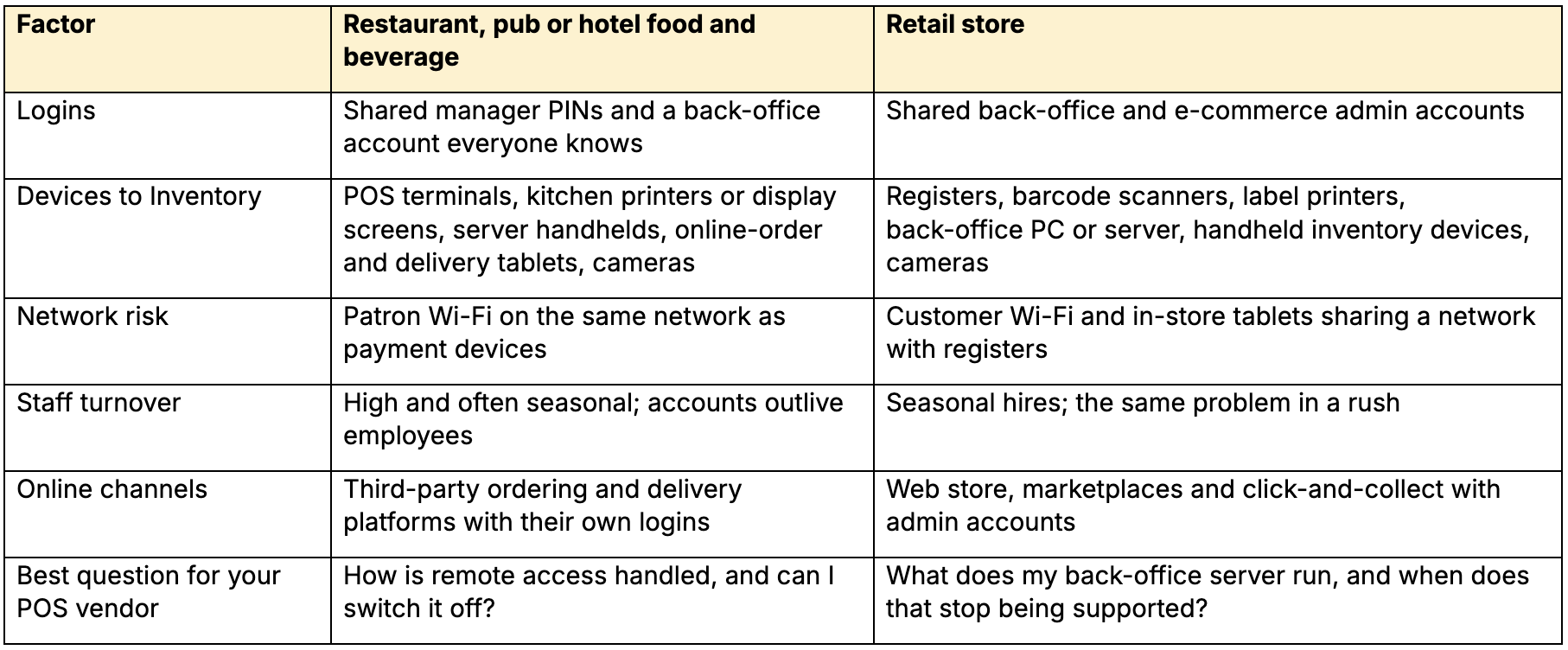
What the minimum looks like in a restaurant and in a retail store
The ten safeguards are the same in both. The places they bite are different. This table applies them to the two kinds of business; the examples are our practical reading, not findings from the sources above.
If you run more than one location
Set one standard and apply it everywhere: the same firewall approach, the same security software, the same offboarding rule. Differences between sites are where gaps hide, and they make every problem harder to diagnose. That is our judgment, not a finding from the sources.
If you already have an IT person
Covering email security, patching, identity checks, training and after-hours incidents across every location is a lot for one or two people. That is not a criticism of them. The minimum list above works well as a gap check for an in-house team: for each of the ten, who owns it, and who covers it when they are away?
A ten-minute cybersecurity self-check for owners and managers
Check off what is true today, not what’s planned. Every unticked box is a gap, and every gap is a conversation to have this week.
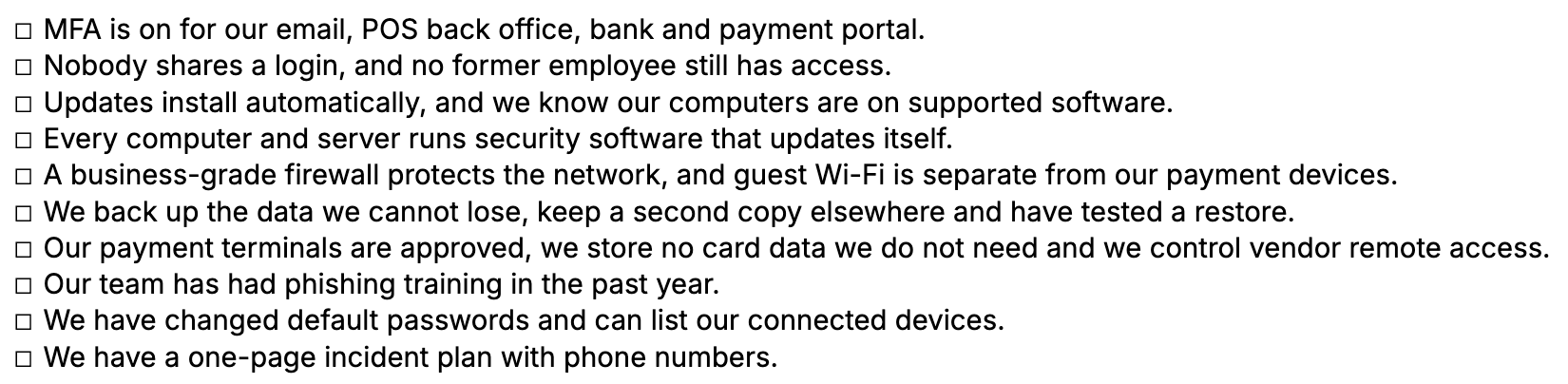
How to read your result. This check is ours, not a formal score. If you ticked all ten, you meet the floor, and the next step is to confirm each with evidence (a screenshot, a restore test, a vendor email). If you left gaps, our suggested order is: MFA first, because it is quick and the research behind it is strong; then backups and updates; then everything else. That order is a judgment, not a rule from the Cyber Centre or the PCI Council.
If you cannot tell whether a box is true, that is an answer too. Treat it as unticked.
What to do in the first hour if something goes wrong
The Cyber Centre's baseline advice is blunt: "Organizations should assume that cyber security incidents will occur." An incident plan, in Get Cyber Safe's words, "outlines how your business will detect, respond to and recover from a cyber incident" (Get Cyber Safe). Yours can be a single page.
A starting point for your one-page plan
This is our practical outline, not a regulator's checklist. Adjust it with your IT provider.
Write down what you see and when. Screens, messages, odd behaviour, the time. You will need it later.
Call your IT provider or POS vendor first. Put their numbers at the top of the page.
Isolate the affected device if you are told to. Ask your provider what "isolate" means for your equipment before you need it.
Call your payment processor if card data or payment devices could be involved.
Change passwords for affected accounts from a device you trust, and check that MFA is on.
Keep records. You may need them for the privacy rules below.
Report it. The Cyber Centre has an online form for a business or organization in Canada to find where to report, and its incident page says to contact local police in an emergency (Cyber Centre).
Decide how you will keep trading if systems are down, such as taking payments another way, and write that into the plan.
Your privacy-breach duties in Canada
If customer or employee personal information is lost or accessed without authorization, the federal privacy law PIPEDA sets rules for organizations it covers, according to the Office of the Privacy Commissioner of Canada (OPC):
Report to the OPC any breach of security safeguards involving personal information under your control that "creates a real risk of significant harm" to an individual.
Tell affected individuals "as soon as feasible" after you determine the breach meets that risk threshold.
Keep a record of every breach, whether or not it meets the threshold. "The law requires you to keep breach records of all breaches of security safeguards for two years."
Whether PIPEDA or a provincial law applies to you depends on your business and where you operate. This is general information, not legal advice. If you have a breach, speak with a lawyer or your privacy officer.
Doing it yourself, or getting help
You can do a good share of this yourself. Some of it is worth handing to someone whose job it is. Here is our honest split.
Safeguard
Do it yourself?
When to get help
1. MFA
Yes, usually a few minutes per account
If you have many accounts or locations to keep consistent
2. Own logins
Yes
When turnover is high and offboarding keeps slipping
3. Updates
Mostly, on office PCs
For POS terminals, servers and mixed equipment you do not want to break mid-service
4. Security software
Basic antivirus, yes
When you want EDR that someone actually watches
5. Firewall and guest Wi-Fi
Rarely
Almost always, because mistakes here are invisible until they matter
6. Backups
Yes, if you test them
If no one will own the restore test
7. Card payments
Partly
Your processor and POS vendor must be part of it
8. Training
Yes, with free public material
If you want it repeated and tracked
9. Secure devices
Yes, with an inventory
Across many sites
10. Incident plan
Yes, but pick your first call now
To rehearse it
The table is our judgment. Your situation may differ.
What we do at Pineapple Bytes
We are a point-of-sale and technology partner for restaurants, hotels and retailers, with offices in Dartmouth, Nova Scotia and Markham, Ontario. Our managed IT services cover much of this list: email protection and anti-phishing, endpoint security and Windows patching, a managed firewall, identity protection and login monitoring, and staff security training.
If you want to know where you stand, we will run a free IT and network health check against this checklist and give you a plain-language report.